ChatGPT Prompts for YouTube: My Personal Workflow for Faster Content Creation
Creating YouTube videos consistently is one of the hardest parts of being a content creator. The biggest challenge is usually not editing or filming — it’s coming up with fresh ideas and turning them into engaging scripts without spending hours researching.
Over the past few months, I started experimenting with different ChatGPT prompts for YouTube to speed up my workflow. After testing a lot of approaches, I realized something important:
You do not need complicated AI prompts to make quality content.
In fact, the simplest prompts often work the best.
In this article, I’m going to share the exact workflow I personally use to generate:
- Video ideas
- Titles
- Hooks
- Scripts
- Tags
- Descriptions
- Thumbnail ideas
- CTAs
And the best part is that the entire process usually takes less than 10 minutes.
This is not theory. This is the actual system I use while creating content for my own YouTube channel.
Why ChatGPT Prompts for YouTube Matter in 2026 ?
The YouTube competition is growing every single day.
Creators are uploading more content than ever, which means:
- More competition for clicks
- More competition for watch time
- More pressure to stay consistent
Earlier, creating one good script could easily take several hours because of:
- Topic research
- Structuring the script
- Writing hooks
- Thinking about titles
- Planning thumbnail concepts
Now, AI tools like ChatGPT can dramatically reduce that workload if used correctly.
But there’s one important thing most creators misunderstand.
AI does not replace creativity.
It speeds up execution.
That’s the mindset I personally use while working with ChatGPT prompts for YouTube.
Instead of letting AI fully control the content, I use it as a workflow assistant.
My Real Creator Workflow Using ChatGPT for YouTube Scripts
The workflow below is the exact process I demonstrated in my video.
I’m sharing it here in a step-by-step format so you can apply it directly to your own channel.
Step 1: Define Your Niche and Audience
Before generating anything, I always tell ChatGPT:
- My niche
- My target audience
- My content goal
This gives the AI proper context.
Example Prompt
My niche is finance and my audience is mostly in India. Suggest me 10 video ideas around my niche that can give high CTR and can go viral.
This is always my starting point.
The goal here is not to blindly copy every idea.
The goal is to identify topics that:
- Have strong curiosity
- Can attract clicks
- Match audience interest
- Fit your channel style
Why This Step Matters
A lot of creators jump directly into script writing.
That usually leads to weak topics.
If your topic itself is not strong, even a good script will struggle.
That’s why I always spend time choosing the right idea first.
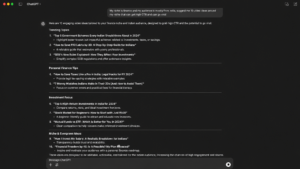
(ChatGPT generating 10 viral video ideas based on niche and audience)
Step 2: Generate Better YouTube Titles
Once I choose a topic, the next step is title generation.
For example, let’s say I select this topic:
How to Save 10 Lakhs by Age 30
Now I ask ChatGPT to generate multiple title variations.
Prompt I Use
Suggest some good YouTube titles for this video.
Simple.
That’s it.
You don’t need advanced prompt engineering.
ChatGPT usually gives multiple clickable variations like:
- Stop Wasting Money: Save 10 Lakhs Before 30
- How I Would Save 10 Lakhs Starting From Zero
- The Smart Money Blueprint for Your 20s
From there, I manually choose the one that feels:
- More clickable
- More emotional
- Easier to understand
Creator Tip
Do not completely depend on AI-generated titles.
I usually modify the final title slightly based on:
- My audience style
- CTR patterns
- Previous video performance
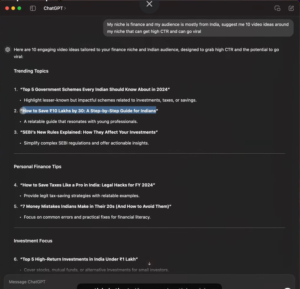
(Multiple title suggestions generated inside ChatGPT)
Step 3: Generate YouTube Tags Quickly
Tags are not the biggest ranking factor anymore, but I still use them for additional context.
Instead of manually thinking about tags, I simply ask ChatGPT.
Prompt
Suggest video tags for this video in comma separated format.
This instantly saves time.
The main advantage is speed.
Especially when you’re uploading multiple videos in a day, even small automation improvements matter.
Step 4: Generate SEO-Friendly Video Descriptions
This is one of my favorite use cases for ChatGPT prompts for YouTube.
Writing descriptions manually gets repetitive very quickly.
So I use prompts like this:
Prompt
Give a brief video description within 200 characters along with timestamps for my video chapters.
Or sometimes:
Give a detailed video description within 300 words along with timestamps.
The interesting part is that ChatGPT also gives a structured chapter format which becomes a great starting point.
I still manually edit:
- Time stamps
- CTA links
- Affiliate sections
- Important keywords
But overall, it cuts down a lot of work.
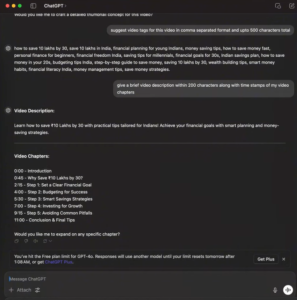
(Description and timestamp structure generated by ChatGPT)
⸻
Step 5: Create Strong Video Hooks
The first 15 seconds of a YouTube video matter more than almost everything else.
If the hook fails, retention drops.
So I use ChatGPT to brainstorm hook structures.
Prompt
Give a good hook script in English for this video.
The output usually includes:
- Opening line ideas
- Curiosity angles
- Emotional triggers
- Fast intros
Sometimes it even suggests camera direction or tone.
I never read the hook word-for-word.
Instead, I use it as inspiration and convert it into my own speaking style.
Why This Works
Most creators struggle with starting videos.
A simple hook prompt gives you momentum instantly.
Step 6: Generate the Full Video Script
This is where the workflow becomes extremely powerful.
Once the topic, title, hook, and structure are ready, I ask ChatGPT for a detailed script.
Prompt
Now give a detailed video script with points to be discussed in English in a listed manner.
What I like about this approach is that the output usually comes structured chapter-by-chapter.
For example:
- Introduction
- Problem statement
- Step-by-step explanation
- Examples
- Conclusion
This becomes incredibly useful while filming because I can simply follow the structure naturally on camera.
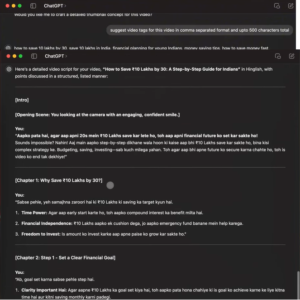
(Full structured script generated chapter-by-chapter)
Why I Don’t Copy the Script Word-for-Word
This is extremely important.
I never recommend reading AI scripts exactly as they are.
That’s where content starts sounding robotic.
Instead, I use ChatGPT as:
- A research assistant
- A structure generator
- A brainstorming tool
Then I add:
- Personal experience
- Real examples
- My speaking style
- Audience understanding
That combination creates videos that still feel human and authentic.
Step 7: Generate Better CTAs
Most creators ignore their ending CTA.
But a good CTA can increase:
- Session time
- More views
- Subscriber conversion
- Video chaining
So I ask ChatGPT:
Prompt
Tell me a good CTA section script to end this video and make sure viewers start watching other videos on my channel.
This helps create smoother transitions into related content.
For example:
* Suggesting another relevant video
* Creating curiosity
* Asking a question
* Encouraging engagement
These small improvements matter a lot over time.
⸻
Step 8: Generate Thumbnail Ideas
Thumbnail brainstorming is another area where ChatGPT becomes useful.
Prompt
Give me some video thumbnail ideas for this video to achieve high CTR.
The AI often suggests:
- Text ideas
- Emotion concepts
- Layout structures
- Color directions
- Curiosity angles
I still design thumbnails myself, but these suggestions help speed up the brainstorming process.
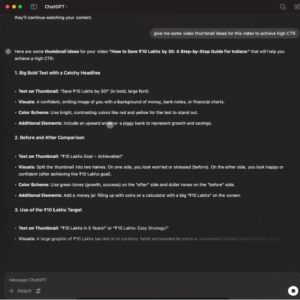
(Thumbnail angle ideas generated inside ChatGPT)
Step 9: Add Engagement Facts and B-Roll Ideas
One underrated trick I use is asking ChatGPT for supporting facts.
Prompt
Give me some facts that I can add to this video to keep the audience engaged.
This helps generate:
- Quick statistics
- Interesting comparisons
- Attention resets
- B-roll moments
These tiny additions improve retention and make the video feel more dynamic.
The Biggest Mistake Creators Make With AI
After testing dozens of AI tools, I noticed one huge problem.
Many creators waste money on complicated tools they don’t actually need.
Honestly, simple ChatGPT prompts for YouTube are already powerful enough for most creators.
You do not need:
- Overcomplicated workflows
- Expensive AI subscriptions
- Fancy automation systems
Most of the time, a few well-structured prompts are enough.
That’s exactly why I personally prefer keeping my workflow simple.
My Personal Experience Using This Workflow
Before using AI tools consistently, script writing used to take me hours.
Especially for:
- Research-heavy videos
- Structured educational content
- SEO-focused videos
Now the process feels much faster.
Sometimes I can prepare multiple scripts in a single day because:
- Topic research becomes faster
- Structuring becomes easier
- Brainstorming becomes instant
But again, the important thing is this:
AI gives the structure.
You still need to bring the personality.
That’s the part audiences actually connect with.
SEO Tips for Using ChatGPT Prompts for YouTube
Here are some practical SEO lessons I personally follow.
1. Focus on Search Intent
Do not chase random viral ideas.
Choose topics people are actively searching for.
2. Optimize Titles for Humans First
CTR matters more than stuffing keywords.
Your title should create curiosity naturally.
3. Use Keywords Naturally
I include my main keyword in:
- Title
- Description
- Intro
- Headings
- Conclusion
But I avoid repeating it unnaturally.
4. Structure Your Content Clearly
Both YouTube and Google prefer:
- Organized content
- Chapters
- Clear formatting
- Readability
5. Improve Retention
Good hooks matter more than most creators realize.
Retention helps videos perform better long term.
Lessons I Learned After Using AI for Content Creation
Here are some honest lessons from my own experience.
AI Saves Time, Not Creativity
Your unique perspective still matters.
Simple Prompts Work Best
Most of my prompts are extremely basic.
Complex prompts are often unnecessary.
Human Editing Is Essential
Never publish raw AI output without editing.
Always add:
- Personality
- Experience
- Examples
- Natural language
Consistency Becomes Easier
Once the workflow becomes repeatable, creating content regularly becomes much less stressful.
Final Thoughts
Using ChatGPT prompts for YouTube completely changed how I approach content planning and script creation.
Not because AI magically creates perfect videos.
But because it removes friction from the process.
Instead of spending hours stuck on:
- Video ideas
- Titles
- Script structure
- Hooks
I can now focus more on:
- Delivery
- Creativity
- Filming
- Audience connection
And honestly, that’s where creators should spend most of their energy anyway.
If you are a YouTube creator trying to upload more consistently without burning out, this workflow is absolutely worth testing.
Keep the prompts simple.
Use AI as an assistant, not a replacement.
And most importantly, make the final content sound like you.
FAQ: ChatGPT Prompts for YouTube
Can ChatGPT write full YouTube scripts?
Yes, ChatGPT can generate complete script structures, hooks, outlines, and talking points. However, it’s best to personalize the final script with your own experience and speaking style.
⸻
Are ChatGPT prompts for YouTube good for SEO?
They can help with SEO by generating:
- Titles
- Descriptions
- Tags
- Keyword ideas
- Structured outlines
But human editing is still important for quality.
Do I need paid AI tools for YouTube scripting?
Not necessarily. Many creators can achieve excellent results using basic ChatGPT workflows without expensive AI software.
How long does this workflow take?
In my personal experience, generating a complete video structure can take anywhere from 5 to 15 minutes depending on the topic.
Should I copy AI-generated scripts directly?
No. Always edit and personalize the content. Direct AI scripts often sound robotic and reduce audience connection.